Build a study
Combine typed snippets and nested structures. Declare choices, seeds, exclusions and the analysis plan. Start with the recorded arithmetic example or the structured-record example; neither requires a model account.

ToolsEnabled Bench
Compose prompts from reusable parts, freeze the protocol, and export a study whose reports can be regenerated from retained evidence. A local research workbench with a browser dashboard and twelve tools for MCP clients. No ToolsEnabled account is required.
ToolsEnabled Bench 0.3.3 beta · MIT licensed · Node.js 22.19 or later
One benchmark family. Engine Bench and Head Gasket Bench keep their own tasks and scoring. This page is the workbench for the next study.
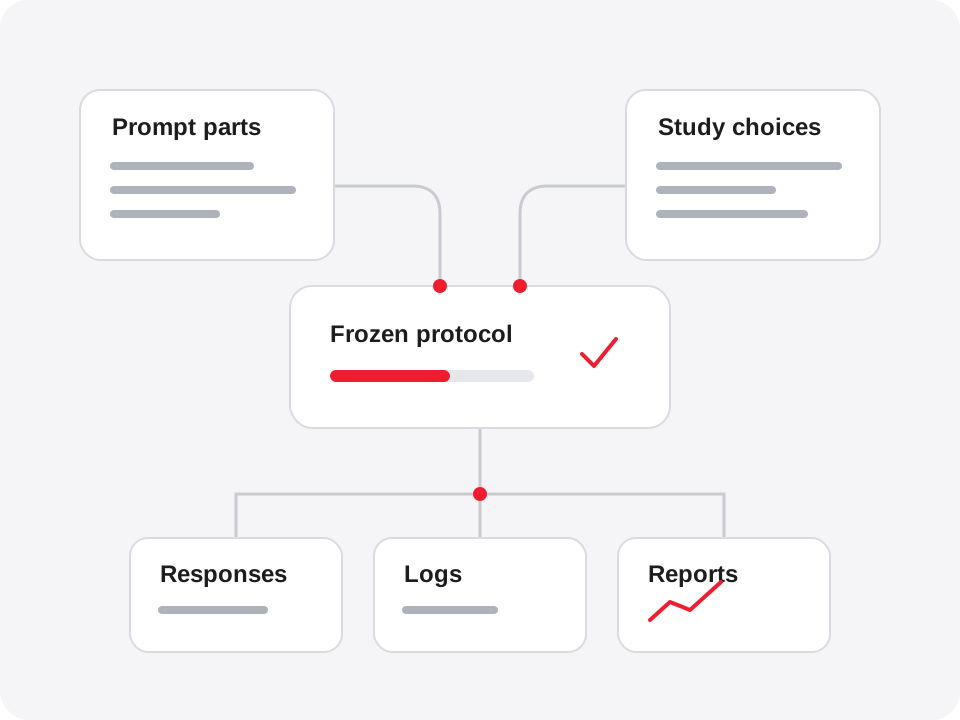
How it works
Combine typed snippets and nested structures. Declare choices, seeds, exclusions and the analysis plan. Start with the recorded arithmetic example or the structured-record example; neither requires a model account.
Save an identity for the specification, runtime, required plugins, prompts and schedule. Export them together with a standalone CLI and file hashes.
Inspect attempts, responses, logs and scoring evidence. Regenerate HTML and Markdown reports from the retained run. A new stochastic model response is not expected to match a previous one.
Local data
Projects, frozen studies, logs and reports stay in the private data folder you choose. The dashboard listens only on 127.0.0.1. The MCP server runs locally over stdio. Bench has no account service, telemetry or automatic upload.

A collector you explicitly run can send prompts and declared inputs to its configured endpoint or invoke local commands and plugins. Those programs run with your user account’s filesystem and network permissions. Execution confirmation and file hashes do not provide an OS sandbox.

Your MCP client may send results to its model provider under that provider’s policies. Saved evidence and exported studies may contain private data; review them before sharing.

Back up the whole data folder and retain the matching trusted runtime for old studies. Read the release privacy notice for storage and retention details.
Install
Version 0.3.3 beta was published on 15 October 2026. The same runtime ZIP serves the dashboard and local MCP server. It includes the prebuilt application and pinned MCP SDK. Install Node.js 22.19 or later separately; the runtime archive needs no npm install.
Expected runtime ZIP SHA-256: ece76defcbd817262faff6a8391f5b77fe17343359733e1129c21677e7afdce2. Compare before extraction. Obtain the archive from a source you trust; checksums establish integrity, not publisher authentication. Use a fresh installation folder and a private local data folder outside it. Stop if any step fails.
Download the ZIP and its sidecar into one fresh folder. Linux uses sha256sum; on macOS use the indicated shasum check instead. Continue only when the checksum reports OK.
node --version
# Linux
sha256sum -c toolsenabled-benchmark-builder-0.3.3.zip.sha256
# macOS: use this check instead
shasum -a 256 -c toolsenabled-benchmark-builder-0.3.3.zip.sha256
unzip toolsenabled-benchmark-builder-0.3.3.zip
cd toolsenabled-benchmark-builder-0.3.3
node tools/release.mjs --verify
export BENCHMARK_DATA_DIR="$HOME/ToolsEnabled-Bench-data"
node server/main.mjsCompare the PowerShell hash with the sidecar before extraction. Then run the remaining commands in the same window.
$ErrorActionPreference = 'Stop'
node --version
Get-FileHash .\toolsenabled-benchmark-builder-0.3.3.zip -Algorithm SHA256
Get-Content .\toolsenabled-benchmark-builder-0.3.3.zip.sha256
Expand-Archive .\toolsenabled-benchmark-builder-0.3.3.zip -DestinationPath .\bench-install
Set-Location .\bench-install\toolsenabled-benchmark-builder-0.3.3
node tools/release.mjs --verify
if ($LASTEXITCODE -ne 0) { throw 'Bench archive verification failed.' }
$env:BENCHMARK_DATA_DIR = Join-Path $env:USERPROFILE 'ToolsEnabled-Bench-data'
node server/main.mjsOpen http://127.0.0.1:4318. Choose A small, complete study, then Freeze project and Run frozen study locally. The example uses recorded responses; inspect its reports in Local runs. Leave the terminal open; Ctrl+C stops the dashboard.
MCP hosts
Stop the dashboard first. From the extracted runtime, with BENCHMARK_DATA_DIR still set, print the configuration for your client. The helper prints setup; it does not change your client.
Prints a terminal registration command. Review it, run it in the matching shell, then open a new session.
node tools/mcp-config.mjs --client claudePrints JSON for the client configuration. Merge it with existing entries. This is the Node/stdio route; native Desktop bundle acceptance remains unverified.
node tools/mcp-config.mjs --client claude-desktopPrints a terminal registration command. Review it and run it in the matching shell. For long studies, set a suitable tool_timeout_sec in the Bench MCP configuration.
node tools/mcp-config.mjs --client codexPrints JSON for MCP configuration. Review the paths and merge it with existing entries.
node tools/mcp-config.mjs --client cursorPrints a Cordis overlay entry. Merge it into the appropriate plugin list; keep your existing configuration.
node tools/mcp-config.mjs --client deepseekThe twelve tools cover saved projects, atoms, compositions, task generation, freezing, export, qualification, running, analysis and reports. Execution requires the exact study ID as confirmation; studies frozen elsewhere also need explicit trust after review. See the MCP reference and host setup guide. The previously documented marketplace is unavailable; use direct stdio registration.
Evidence and limits
This beta supplies research apparatus and authored recorded controls. Hashes establish content identity. They do not establish independent scientific validity, prospective registration or authenticated provider identity.
Inspect a received study through an already trusted Bench installation. Running the received study’s own CLI executes its code before it can verify anything.
Optional native domain apparatus has separately declared dependencies and limits; it is not required for the recorded examples. Native Lean/Docker campaigns and live-model collection remain unverified for this release.
Cite the software version and each study separately. Historical frozen records keep their original generator identities and matching runtime.
Read the code, run the source tests and report issues on GitHub.
Current release: ToolsEnabled Bench 0.3.3 beta · Release notes · Security policy · Privacy · MIT license
Released as tag v0.3.3 from commit 988e6705cfa66cbac7176f99b59b8e9760b2dd9d. The release records 585/585 exact-source tests locally and in GitHub CI, browser checks and independent Linux clean-folder review. Two clean source builds and an extracted-runtime repack produced identical archive bytes; all seven release assets were downloaded back and matched. See VERIFICATION.json for scope and toolchain.