One connection per robot
Start one hub. Give each MCP host only its robot’s private connection file, and keep the coordinator connection with the coordinator.

ToolsEnabled Sim
A shared warehouse for three or four wheeled robots. Each agent controls one robot through MCP; a coordinator assigns crates and advances the world in lockstep.
Sim 0.1.13 prerelease · Linux and native Windows CLI/stdio
How it works
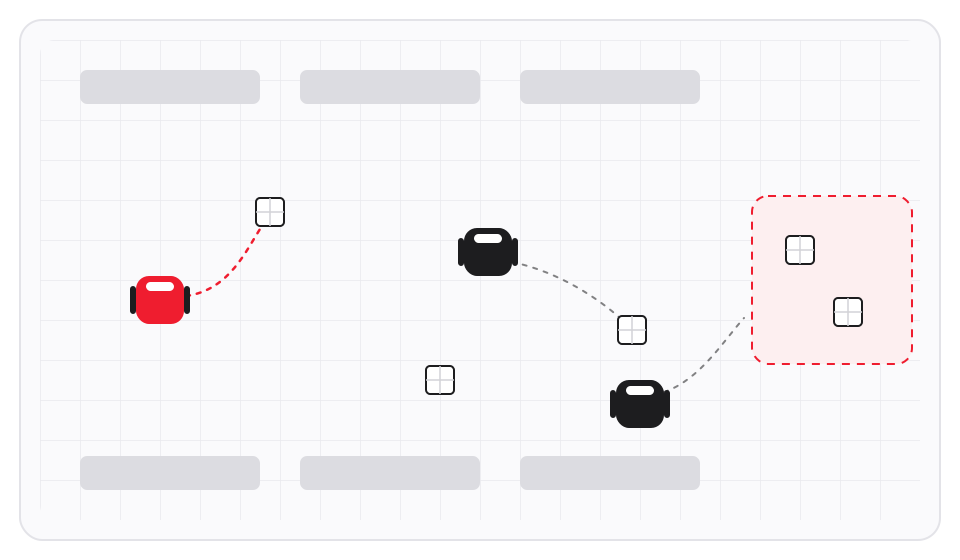
Each robot has its own work. The coordinator keeps one shared world in step.
Start one hub. Give each MCP host only its robot’s private connection file, and keep the coordinator connection with the coordinator.
The coordinator collects robot commands, then calls sim.step. A slow agent changes wall-clock duration, never simulation timing.
Replay verifies the complete hash chain, re-executes the actions in fresh physics and compares the trajectory bytes.
What you get
The engine is recorded with every run. Replay rebuilds the world on that same engine.

Both WebAssembly physics engines are pinned. Rapier runs without gravity or friction; --engine mujoco adds gravity, floor friction and bounded motor forces. The hub keeps its engine for its lifetime.

The included scripted demo launches one coordinator and three robot agents as four real stdio MCP clients. It delivers three crates in ten seconds of simulation time, with no collisions on either engine.

Any MCP host that runs a stdio server can drive a robot. Robot connections receive six tools in manual mode and seven in live mode. Read the tool schemas.

JSON scenarios define robots, crates, obstacles and delivery zones. In live mode, the launcher steps when all active robots submit or a 120-second wall-clock budget expires; missing robots hold.

Three.js replays the log into first-person, chase, overhead and combined views. Local capture produces 1080×1080 PNG sequences at 30 simulation frames per second, with every view marked SIMULATION.
No model, agent CLI, cloud service, browser or GPU is required for the simulation. No provider credentials or model calls are needed.
The fine print, plainly
Sim has no dashboard or human-control link. The human starts the hub and finds connection-file paths in its launch terminal. Capture and replay are explicit human-run local commands.
Agent file/shell tools running as the same user can read host logs and private connection files; project scope and skill guidance do not provide OS isolation. The local tools do not isolate hostile processes running as the same operating-system user. Read the security limits.
Robots are velocity-controlled and grasp crates rigidly. There is no wheel slip, ramps, cameras-as-sensors or learning. MuJoCo adds gravity and friction while robots still drive in the plane.
The bounded grid planner accounts for obstacles and current robot/crate positions. It does not predict other robots’ future paths or promise collision-free motion for arbitrary concurrent commands.
Physics replay is byte-identical with the recorded engine’s pinned package and the same action log on the tested Node/platform. Identical frames require the same Chromium binary, SwiftShader runtime, platform and renderer; there is no cross-GPU or cross-browser guarantee. After a storage failure stops the hub, that run’s recording can end in a partial record and cannot be replay-verified; start a new hub to continue.
Linux and native Windows CLI/stdio qualification is separate from real agent GUI/client sessions. Windows 11 and native browser capture remain unqualified or owner-pending. Read the Windows installation note below and the Windows guide for the measured scope.
Install
Sim 0.1.13 is a prerelease published on 15 October 2026. Linux and Windows use the same ZIP and sidecar.
ZIP: 5,500,571 bytes, SHA256 ab7acb5e62175b9b4e4ef9897fa1a0c35759fe92329f5c22ff3c2d592e31c2ed.
Download the same ZIP and sidecar. Node.js 22+ is required:
sha256sum -c toolsenabled-sim-0.1.13.zip.sha256
unzip toolsenabled-sim-0.1.13.zip
cd sim
node tools/demo.mjs --output ./runs/demo
node tools/replay.mjs ./runs/demo
Git and ZIP contain the same pinned offline dependencies. No npm installation or browser download runs during installation or startup. Follow docs/CODEX-INSTALL.md for the self-distributed Codex plugin and its limits.
The output directory must be new; choose a new output path for each subsequent run. Rapier prints a harmless upstream notice about deprecated initialization parameters; it does not change the recorded physics. MuJoCo does not print it.
Download the ZIP and SHA256 sidecar. Requires Node.js 22+ and Windows PowerShell 5.1. Use a normal, non-elevated terminal and a new download folder:
$expected = ((Get-Content .\toolsenabled-sim-0.1.13.zip.sha256 -Raw).Trim() -split '\s+')[0]
if ((Get-FileHash .\toolsenabled-sim-0.1.13.zip -Algorithm SHA256).Hash.ToLowerInvariant() -cne $expected) { throw 'Archive checksum mismatch' }
Expand-Archive .\toolsenabled-sim-0.1.13.zip -DestinationPath .\sim-013
Set-Location .\sim-013\sim
.\install.cmd
The installer uses a new %LOCALAPPDATA%\ToolsEnabled\Sim\0.1.13 directory and changes no client settings. Follow the installed Windows guide for connection paths and the separate Codex plugin setup.
Native Windows uses private per-user ACLs and fixed local NTFS paths. Use a normal terminal: elevated-created private files can correctly refuse. CLI/stdio, both physics engines, Unicode installation and inert pane lifetime/history fixtures passed on Windows 10 Pro 22H2 build 19045 with a calibrated medium token, followed by a different worker's fresh-folder public workflow. History reads at most 256 retained runs; the timing fixture used one real run and 255 synthetic copies. Windows 11, native browser capture and real Windows GUI/client sessions remain unqualified or owner-pending. The Codex plugin has no Claude pane hooks or origin guarantee. This remains a prerelease; no OpenAI or Anthropic directory approval is claimed.
Linux: run the same demo on MuJoCo and verify its recording
node tools/demo.mjs --output ./runs/demo-mujoco --engine mujoco
node tools/replay.mjs ./runs/demo-mujocoConnect your agents
Start a shared world and keep the process running. Give each host only the connection for its assigned robot.
Start the hub with a new private directory
node src/hub-cli.mjs --root /absolute/private-sim-runReplace the example root with your own absolute path. Add --engine mujoco for MuJoCo. The launch terminal prints private connection-file paths.
The repository is its own plugin marketplace. Add it in Claude Code:
claude plugin marketplace add ToolsEnabled/toolsenabled-simThe plugin needs the absolute path of a connection file (robot or coordinator) from a running hub; the guide below gives the exact install command.
To run several robots on one operating-system account, set a separate CLAUDE_CONFIG_DIR for each robot agent before installing the plugin in Claude Code; the guide's several-robots section shows the commands.
Start a private hub separately and keep it running. Before starting Codex, set SIM_CONNECTION to the printed absolute connection-file path for its assigned robot. Give it only that robot’s connection file, never another robot’s or the coordinator’s capability. The plugin never starts another hub.
codex plugin marketplace add ToolsEnabled/toolsenabled-sim --ref main
codex plugin add toolsenabled-sim@toolsenabled-sim
codex mcp list
Start a new Codex session after installation or configuration changes. The skill is $toolsenabled-sim:toolsenabled-sim; begin with a direct request for read-only status and observation. Codex does not run Claude pane/action hooks and cannot claim their composer-origin guarantee. Use normal client approvals and act only on the person’s direct request. Read the Codex setup and limits. This is self-distribution, with no OpenAI directory listing or approval.
Read the source, run the warehouse and inspect its recordings. Documentation and issues are on GitHub.
Current release: Sim 0.1.13 prerelease · Release notes · Security policy · Data and privacy
Published prerelease v0.1.13 from commit 283751d4f3f2fd686a3c1860d721b4ca0578fa82. Both release files were downloaded back byte-identically.